Nimble Commander and build times

This year I took a pause from developing Nimble Commander; during that time, I had some fun with software rendering – it’s actually quite enjoyable when you get fast feedback from your code on the screen and you’re not burdened by a sizeable codebase.

Upon getting back to NC, one thing I realized was that I can’t tolerate the very slow development feedback cycle anymore. On a local machine, build times were tolerable – e.g., on the base M1 CPU the project could be built from scratch in ~5 minutes. On GitHub Actions, however, the situation was rather miserable: the feedback time was somewhere between 30 and 60 minutes, depending on luck:
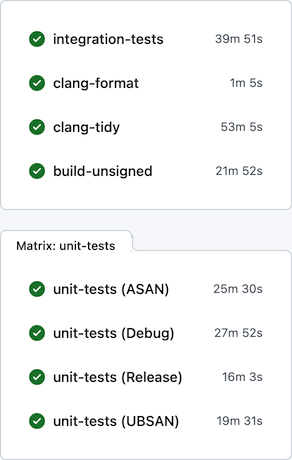
Generally, I find macOS to be a rather hostile platform for developers (but amazing for users), where just keeping up to date with the constant streak of changes requires a lot of effort. Multiplied by other oddities of the ecosystem, maintenance becomes rather tedious. For example, the “clang-tidy” CI job has to first build all targets via xcodebuild, eavesdropping on the compiler invocations, manually clean the Xcode-specific arguments, and only after all that acrobatics actually execute clang-tidy. Another example of the oddities that make the CI so slow: the “integration-tests” job has to run its Docker containers backed by full QEMU emulation (sloooow), since Apple Silicon didn’t allow nested virtualization up until M3 which is still unavailable on GitHub’s runners.

Previously I tried using a combination of xcodebuild + ccache + GitHub Actions / Jenkins to improve the CI turnaround time, with limited success, and ended up dropping this caching altogether. Microsoft is very generous in giving unlimited free machine time on three platforms to Open-Source projects, which I guess somewhat disincentives optimizing resource usage. Seriously though, thank you, Microsoft! Being able to build/package/test/lint/analyze per each commit on real Mac hardware is absolutely amazing. It’s hilarious that in developing Nimble Commander – an application that targets solely macOS – I’m getting support from Microsoft instead of Apple, but I digress…

This time I focused on two other areas in an attempt to improve the CI turnaround time: minimizing xcodebuild invocations and using unity builds.

Less xcodebuild invocations

Previously, the scripts that run tests (e.g. “run_all_unit_tests.sh”) tried to do the “right thing”. Targets of the test suites can be identified by their name suffixes (e.g. “UT” for unit tests and “IT” for integration tests), so the scripts asked the build system to provide a list of targets, filtered the list to what they needed, then built those targets one by one and finally ran them. This approach isn’t the most efficient, as it sometimes leaves the build system without enough work to do in parallel. To visualize, here’s how the CPU load previously looked sometimes:
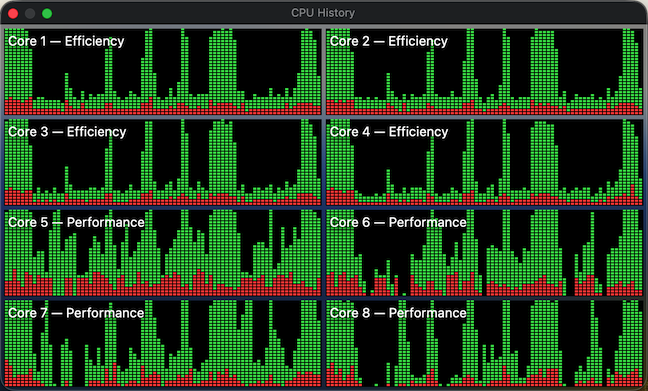
The periods of low CPU usage represent the time when either the build system isn’t running yet or already has fewer targets than available CPU cores to work on in parallel. To improve system utilization, I dropped this “smart” approach and instead manually created explicit “umbrella” schemes that pull in a set of targets, e.g. “All”, “UnitTests” and “IntegrationTests”. Now the CI scripts effectively perform only two invocations of the build system – one to gather the build paths and another to fire up the actual build. In this setup, xcodebuild is able to construct a full build graph that includes every target and load up all CPU cores very efficiently (make sure to pass “-parallelizeTargets”):
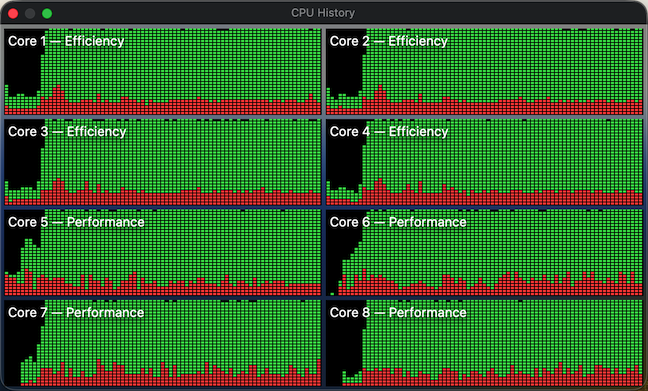
Moral of the story? Whenever you try to do the “right” / ”smart” thing, at least verify with perf tools that this smartness doesn’t backfire.

Unity builds

Unity builds are a nice tool that shouldn’t have existed in the first place. Traditionally, they served two purposes: allowing the compiler to optimize better by accessing more context, and speeding up compilation by doing fewer redundant passes. The prior is largely irrelevant today, as we have LTO/WPO working well across all major compilers. For example, Nimble Commander is built as a large monolithic blob where both 1st- and 3rd- party source is statically linked together with link-time optimization. Unity builds, though, are still applicable. Not only are C++20 modules nowhere near production readiness, I doubt they will ever be applicable to NC, given the ample usage of Objective-C++ and occasional Swift interop. On top of that, compilation of C++ code gets slower and slower with each new Standard, simply due to the sheer size of the ever-expanding standard library code that the compiler has to go through over and over again.

Nimble Commander’s codebase consists of several libraries with well-defined boundaries and the main application, which is currently a rather intertwined monolith. I decided to take a pragmatic approach and move only the internal libraries to unity builds for now (that’s about 70% of the implementation files). Below are a few notes specific to applying unity builds in Nimble Commander and the most important – build times before and after.

Sources files were manually pulled into unity builds one by one. As there are two closely related but different languages in the codebase: C++ and Objective-C++, some of the libraries required two unity files: one “.cpp” and another “.mm”. On top of having two language flavors, the sources have to be built twice for two different architectures (x86_64 and arm64) when producing universal binaries. The final distribution of the sources over the unity build files looked like this:

Unity file Number of included files
_Base.cpp 26
_Base.mm 2
_BaseUT.cpp 13
_Utility.cpp 25
_Utility.mm 34
_UtilityUT.cpp 11
_UtilityUT.mm 12
_Config.cpp 8
_Term.cpp 16
_Term.mm 7
_TermUT.cpp 7
_VFS.cpp 48
_VFS.mm 7
_VFSUT.cpp 9
_VFSIcon.cpp 3
_VFSIcon.mm 15
_Viewer.cpp 18
_Viewer.mm 12
_Highlighter.cpp 5
_ViewerUT.cpp 12
_Panel.cpp 8
_Panel.mm 15
_PanelUT.mm 8
_Operations.cpp 17
_Operations.mm 33
_OperationsUT.cpp 2
_OperationsUT.mm 3
_OperationsIT.cpp 7

Quite a lot of files required some touches:

  • In Objective-C++ files, localization based on NSLocalizedString() doesn’t work well with unity builds. Xcode’s automatic strings extraction tool stops processing these calls, seemingly only looking into source files directly compiled by the build system. The solution was to move any calls to this magic function into a single file that’s not included in the unity build. It’s ugly but works.
  • Any static functions had to be either converted into static member functions or prefixed with a clarifying name. The same applies to static constants, type definitions, and type aliases.
  • Usages of “using namespace XYZ” had to be removed. That’s fine for “normal” C++, but for Objective-C++ it’s rough – Objective-C classes can’t be placed in C++ namespaces, so any references to types inside the same libraries have to be explicit. Inside methods, however, “using namespace XYZ” can still be used.
  • Any #defines or #pragmas have to scoped and reverted back.
  • In test suites, it was possible to cheat a bit and wrap the entire set of test cases in a unique namespace per file – it’s easier and less disruptive.

With these details out of the way, here’s a comparison of different build times, before and after switching to unity builds, measured on a base M1 CPU:

  Before After
Build the application itself,
x86_64+arm64, Debug
320s 200s
Build the application itself,
x86_64+arm64, Release
298s 229s
Build all targets,
arm64, Debug
212s 143s
Build individual static libraries,
x86_64+arm64, Debug
   
    Base 3.3s 1.6s
    Utility 10.9s 4.1s
    Config 1.8s 1.5s
    Term 4.5s 3.2s
    VFS 26.7s 6.8s
    Panel 6.1s 3.2s

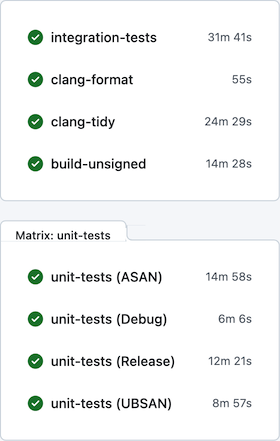
After all these changes, per-commit CI on GitHub Actions looks much better:
Enabling Swift in Nimble Commander

I’m quite interested in introducing Swift in Nimble Commander’s codebase and gradually replacing its UI components with code written in this language. Integrating Swift into this codebase is not straightforward, as there is almost no pure Objective-C code. Instead, all UI-level code is compiled as Objective-C++, which gives transparent access to components written in C++ and its standard library. Frankly, this is often much more efficient and pleasant to use than [Core]Foundation. The challenge before was that interoperability between C++ and Swift was essentially non-existent, and the only solution was to manually write bridges in plain C, which was a showstopper for me. Last year, with Xcode 15, some reasonable C++ <-> Swift interoperability finally became available, but it was missing crucial parts to be meaningfully used in an established codebase. However, with Xcode 16, it seems that the interop is now mature enough to be taken seriously. This week, I converted a small Objective-C component to Swift and submitted the change to Nimble Commander’s repository. It was a rather bumpy ride and took quite a few hours to iron out the problems, so I decided to write down my notes to help someone else spare a few brain cells while going through a similar journey.

The start was promising: enable ObjC++ interop (SWIFT_OBJC_INTEROP_MODE=objcxx), add a Swift file, and Xcode automatically enables Clang modules and creates a dummy bridging header. I had to tweak some C++ code with SWIFT_UNSAFE_REFERENCE to allow the Swift compiler to import the required type, but after that, the setup worked like a charm – the Objective-C++ side created a view now implemented in Swift, and the Swift side seamlessly accessed the component written in [Objective]C++. All of this was fully supported by Xcode: navigation, auto-completion—it all worked! Well, until it didn’t. Trivial functions, like printing “Hello, World!” worked fine, but the actual UI component re-written in Swift greeted me with a crash:

Nimble Commander`@objc PanelListViewTableHeaderCell.init(textCell:):
    0x10128ed74 <+0>:   sub    sp, sp, #0x50
    0x10128ed78 <+4>:   stp    x20, x19, [sp, #0x30]
    0x10128ed7c <+8>:   stp    x29, x30, [sp, #0x40]
    0x10128ed80 <+12>:  add    x29, sp, #0x40
    0x10128ed84 <+16>:  str    x0, [sp, #0x10]
    0x10128ed88 <+20>:  str    x2, [sp, #0x18]
    0x10128ed8c <+24>:  mov    x0, #0x0                  ; =0
    0x10128ed90 <+28>:  bl     0x10149cf84               ; symbol stub for: type metadata accessor for Swift.MainActor
->  0x10128ed94 <+32>:  mov    x20, x0
    0x10128ed98 <+36>:  str    x20, [sp, #0x8]
  ...

This left me quite puzzled—the Swift runtime was clearly loaded, as I could write a function using its standard library, and it was executed correctly when called from the C++ side. Yet the UI code simply refused to work, with parts of it clearly not being loaded—the pointers to the functions were NULL. Normally, I’d expect a runtime to either work correctly or fail entirely with a load-time error, but this was something new. As I don’t have much (or frankly, any) reasonable understanding of Swift’s runtime machinery under the hood, I tried searching online for any answers related to these symptoms and found essentially none. It’s not the kind of experience one would expect from a user-friendly language.

While searching for what other projects do, I stumbled upon a suspicious libswift_Concurrency.dylib located in the Frameworks directory, which gave me a hint—the actors model is related to concurrency, and the presence of this specific library couldn’t be a coincidence. So, out of desperation and curiosity, I blindly copied this library into Nimble Commander’s own Frameworks directory, and lo and behold—it finally worked! There is an option to make Xcode copy this library automatically: ALWAYS_EMBED_SWIFT_STANDARD_LIBRARIES. Another piece of the puzzle was that my @rpath only contained @executable_path/../Frameworks when it should have also included /usr/lib/swift. With these changes, Nimble Commander can now run correctly on macOS 10.15 through macOS 15.

With that done and the actual application built, it was time to tackle the tooling around the project. While Xcode’s toolchain is used to compile Nimble Commander, a separate LLVM installation from Homebrew is used for linting. That’s because Xcode doesn’t include eitherclang-format or clang-tidy (seriously, weird!). Since Apple ships a modified toolchain, consuming the same source code with an external toolchain can be rather problematic. I had to make the following changes to get clang-tidy to pass again after integrating the Swift source:

  • Disable the explicit-specialization-storage-class diagnostic, as the automatically generated bridging code from the Swift compiler seems to contain incorrect declarations.
  • Disable Clang modules by manually removing the -fmodules and -fmodules-cache-path= flags from the response files.
  • Remove framework imports (e.g., @import AppKit;) from the automatically generated bridging headers.
  • Add the paths to the Swift toolchain to the project’s search paths, i.e., $(TOOLCHAIN_DIR)/usr/lib/swift and $(TOOLCHAIN_DIR)/usr/include.
  • Explicitly include the Swift interop machinery before including the bridging header, i.e., #include <swiftToCxx/_SwiftCxxInteroperability.h>.

Such a number of hacks is unfortunate, and I hope to gradually make it easier to maintain.

This concludes the bumpy road to making Swift usable in Nimble Commander, though I’m sure more active use of the language will reveal other rough edges—no interop is seamless.

Painless localization of bundles with Xcode

In Cocoa world, NSLocalizedString() is the “official” way to localize a user-facing string data. It has been around for many years, and most of the time this mechanism works pretty well. Even better, it’s possible to use the XLIFF file format throughout a localization process since the release of Xcode 6. The IDE is smart enough to gather string resources defined in source files and to expose them via XLIFF. This support from IDE and external tools makes the localization process mostly smooth for small projects.

The process gets more clumsy when custom tables (other than “Localizable.strings”) or frameworks come into play. At that moment a relatively slender
NSLocalizedString(@”String”, “comment”)
transforms into a
NSLocalizedStringFromTable(@”String”, “Custom”, “comment”)
or, even worse, into a
NSLocalizedStringFromTableInBundle(@”String”, “Localizable”, [NSBundle bundleForClass:[self class]], “comment”).
With this amount of boilerplate code, an SNR drops below 25% and such inclusions make it hard to reason about the functional logic.

Some projects mitigate this issue by introducing another macro on top of existing, but this approach disables an ability of Xcode to gather localizable strings from the source code. During the refactoring of Nimble Commander’s file operations subsystem (i.e. moving a bunch of code into a separate framework), I found it relatively easy to deal with this issue within the Objective-C++ world.

Since NSLocalizedString is a macro, nobody can stop from removing it away via simple #undef. Next, NSLocalizedString can be defined again as a regular function without any preprocessor magic:

// Internal.h
#pragma once
#undef NSLocalizedString
namespace project {
...
NSString *NSLocalizedString(NSString *_key, const char *_comment);
...
}

This small workaround preserves Xcode’s ability to find and extract localizable strings and is syntactically identical to the macro definition, i.e. no changes are required within an existing code. An implementation of redefined NSLocalizedString is pretty straightforward:

// Internal.mm
#include "Internal.h"
namespace project {
...
static NSBundle *Bundle()
{
  static const auto bundle_id = @"com.company.project.framework";
  static const auto bundle = [NSBundle bundleWithIdentifier:bundle_id];
  return bundle;
}

NSString *NSLocalizedString(NSString *_key, const char *_comment)
{
  return [Bundle() localizedStringForKey:_key value:@"" table:@"Localizable"];
}
...
}

Obviously, “Internal.h” must be included only inside the framework’s source code.


CoreFoundation and memory allocators – why bother?

Any seasoned C++ programmer knows that object allocation does cost CPU cycles, and may cost lots of them. The language itself provides various object allocation types. Such mess might surprise folks who use other user-friendlier languages, especially languages with a garbage collection. But that’s only the beginning. Any C++ Jedi knows about custom allocation strategies, such as memory pools,  buddy allocation, grow-only allocators, can write a generic-purpose memory allocator (probably quite a crappy one) and so forth.
Does it help? Sometimes usage of a custom allocator allows tuning up an application’s performance, by exploiting a specific knowledge about properties of the system.
Does it mean that it might be a good idea to write your own malloc() implementation? Absolutely not. It’s a good challenge for educational purposes, but almost never this will bring any performance benefits.

So what about Cocoa in this aspect?

On Foundation level, Objective-C once had some options to customize the allocation process via NSZone, but they were discarded upon a transition to the ARC. Swift, on the other hand, AFAIK doesn’t even pretend to provide any allocation options.

On CoreFoundation level, many APIs accept a pointer to a memory allocator (CFAllocatorRef) as the first parameter. kCFAllocatorDefault or NULL is passed to use the default allocator, i.e. CFAllocatorGetDefault(), i.e. kCFAllocatorSystemDefault in most cases. CoreFoundation also provides a set of APIs to manipulate the allocation process:
– CFAllocatorCreate
– CFAllocatorAllocate
– CFAllocatorReallocate
– CFAllocatorDeallocate
– CFAllocatorGetPreferredSizeForSize
– CFAllocatorGetContext
An overall mechanics around CFAllocatorRef is quite well documented and, even better, it’s always possible to take a look at the source code of CoreFoundation. So, it’s absolutely ok to use a custom memory allocator on the CoreFoundation level.

“What for?” might be a reasonable question here. Introducing any additional low-level components also implies some maintenance burden in the future, so there should be some heavy pros to bother with a custom memory allocation. Traditionally,  the Achilles’ heel of generic-purpose memory allocators is a dealing with many allocations and consequent deallocations of small amounts of memory. There’re plenty of optimization techniques developed for such tasks, so why not check it on Cocoa?

Suppose we want to spend as less time on memory allocation as possible. Nothing is faster than allocating memory on the stack, obviously. But there are some issues with a stack-based allocation:
• The stack is not limitless. A typical program, which does nothing tricky, is very unlikely to hit the stack limit, but that’s not an advice to carelessly use alloca() everywhere – it will strike back eventually.
• Deallocating a stack-based memory in an arbitrary order is painful and requires some time to manage. In a perfect world, however, it would be great to have an O(1) time complexity for both allocation and deallocation.
• All allocated objects must be freed before an escaping out of allocator’s visibility scope, otherwise, an access to the “leaked” object will lead to an undefined behavior.
To mitigate these issues, a compromise strategy exists:
• Use a stack memory when possible, fall back to a generic-purpose memory allocator otherwise.
• Do increase a stack pointer on allocations, don’t decrease it upon deallocations.
In such case, allocations will be blazingly fast most of the time, while it’s still possible to process requests for big memory chunks. As for the third issue, it falls onto the developer, since the memory allocator can only help with some diagnostic. It’s incredibly easy to write such memory allocator, main steps are described below.

The stack-based allocator is conceptually a classic C++ RAII object. It’s assumed that the client source code will be compiled as C++ or as Objective-C++. The only public method, apart from the constructor and the destructor, provides a CFAllocatorRef pointer to pass into CoreFoundation APIs. The internal state of the allocator consists of the stack itself, a stack pointer, two allocations counters for diagnostic purposes and the CFAllocatorRef pointer.

struct CFStackAllocator
{
  CFStackAllocator() noexcept;
  ~CFStackAllocator() noexcept;
  inline CFAllocatorRef Alloc() const noexcept { return m_Alloc; }
private:
... 
  static const int m_Size = 4096 - 16;
  char m_Buffer[m_Size];
  int m_Left;
  short m_StackObjects;
  short m_HeapObjects;
  const CFAllocatorRef m_Alloc;
};

To initialize the object, the constructor fills counters with defaults and creates a CFAllocatorRef frontend. Only two callbacks are required to build a working CFAllocatorRef: CFAllocatorAllocateCallBack and CFAllocatorDeallocateCallBack.

CFStackAllocator::CFStackAllocator() noexcept:
  m_Left(m_Size),
  m_StackObjects(0),
  m_HeapObjects(0),
  m_Alloc(Construct())
{}

CFAllocatorRef CFStackAllocator::Construct() noexcept
{
  CFAllocatorContext context = {
    0,
    this,
    nullptr,
    nullptr,
    nullptr,
    DoAlloc,
    nullptr,
    DoDealloc,
    nullptr
  };
  return CFAllocatorCreate(kCFAllocatorUseContext, &context);
}

To allocate a memory block, it’s only needed to check whether requested block could be placed in the stack buffer. In this case, the allocation process itself consists only of updating the free space counter. Otherwise, the allocation falls back to the generic malloc().

void *CFStackAllocator::DoAlloc
  (CFIndex _alloc_size, CFOptionFlags _hint, void *_info)
{
  auto me = (CFStackAllocator *)_info;
  if( _alloc_size <= me->m_Left ) {
    void *v = me->m_Buffer + m_Size - me->m_Left;
    me->m_Left -= _alloc_size;
    me->m_StackObjects++;
    return v;
  }
  else {
    me->m_HeapObjects++;
    return malloc(_alloc_size);
  }
}

To deallocate a previously allocated memory block, it’s only needed to check whether that allocation was dispatched to the malloc() and to call free() accordingly.

void CFStackAllocator::DoDealloc(void *_ptr, void *_info)
{
  auto me = (CFStackAllocator *)_info;
  if( _ptr < me->m_Buffer || _ptr >= me->m_Buffer + m_Size ) {
    free(_ptr);
    me->m_HeapObjects--;
  }
  else {
    me->m_StackObjects--;
  }
}

To measure the performance difference between a default Objective-C allocator, a default CoreFoundation allocator and the CFStackAllocator, the following task was executed:
Given N UTF-8 strings, calculate hash values of derived strings which are lowercase and normalized.

An Objective-C variant of the computation:

unsigned long Hash_NSString( const vector<string> &_data )
{
  unsigned long hash = 0;
  @autoreleasepool {
    for( const auto &s: _data ) {
      const auto nsstring = [[NSString alloc] initWithBytes:s.data()
                                                     length:s.length()
                                                   encoding:NSUTF8StringEncoding];
      hash += nsstring.lowercaseString.decomposedStringWithCanonicalMapping.hash;
    }
  }
  return hash;
}

A CoreFoundation counterpart of this task:

unsigned long Hash_CFString( const vector<string> &_data )
{
  unsigned long hash = 0;
  const auto locale = CFLocaleCopyCurrent();
  for( const auto &s: _data ) {
    const auto cfstring = CFStringCreateWithBytes(0,
                                                  (UInt8*)s.data(),
                                                  s.length(),
                                                  kCFStringEncodingUTF8,
                                                  false);
    const auto cfmstring = CFStringCreateMutableCopy(0, 0, cfstring);
    CFStringLowercase(cfmstring, locale);
    CFStringNormalize(cfmstring, kCFStringNormalizationFormD);
    hash += CFHash(cfmstring);
    CFRelease(cfmstring);
    CFRelease(cfstring);
  }
  CFRelease(locale);
  return hash;
}

A CoreFoundation counterpart using a stack-based memory allocation:

unsigned long Hash_CFString_SA( const vector<string> &_data )
{
  unsigned long hash = 0;
  const auto locale = CFLocaleCopyCurrent();
  for( const auto &s: _data ) {
    CFStackAllocator alloc;
    const auto cfstring = CFStringCreateWithBytes(alloc.Alloc(),
                                                  (UInt8*)s.data(),
                                                  s.length(),
                                                  kCFStringEncodingUTF8,
                                                  false);
    const auto cfmstring = CFStringCreateMutableCopy(alloc.Alloc(), 0, cfstring);
    CFStringLowercase(cfmstring, locale);
    CFStringNormalize(cfmstring, kCFStringNormalizationFormD);
    hash += CFHash(cfmstring);
    CFRelease(cfmstring);
    CFRelease(cfstring);
  }
  CFRelease(locale);
  return hash;
}

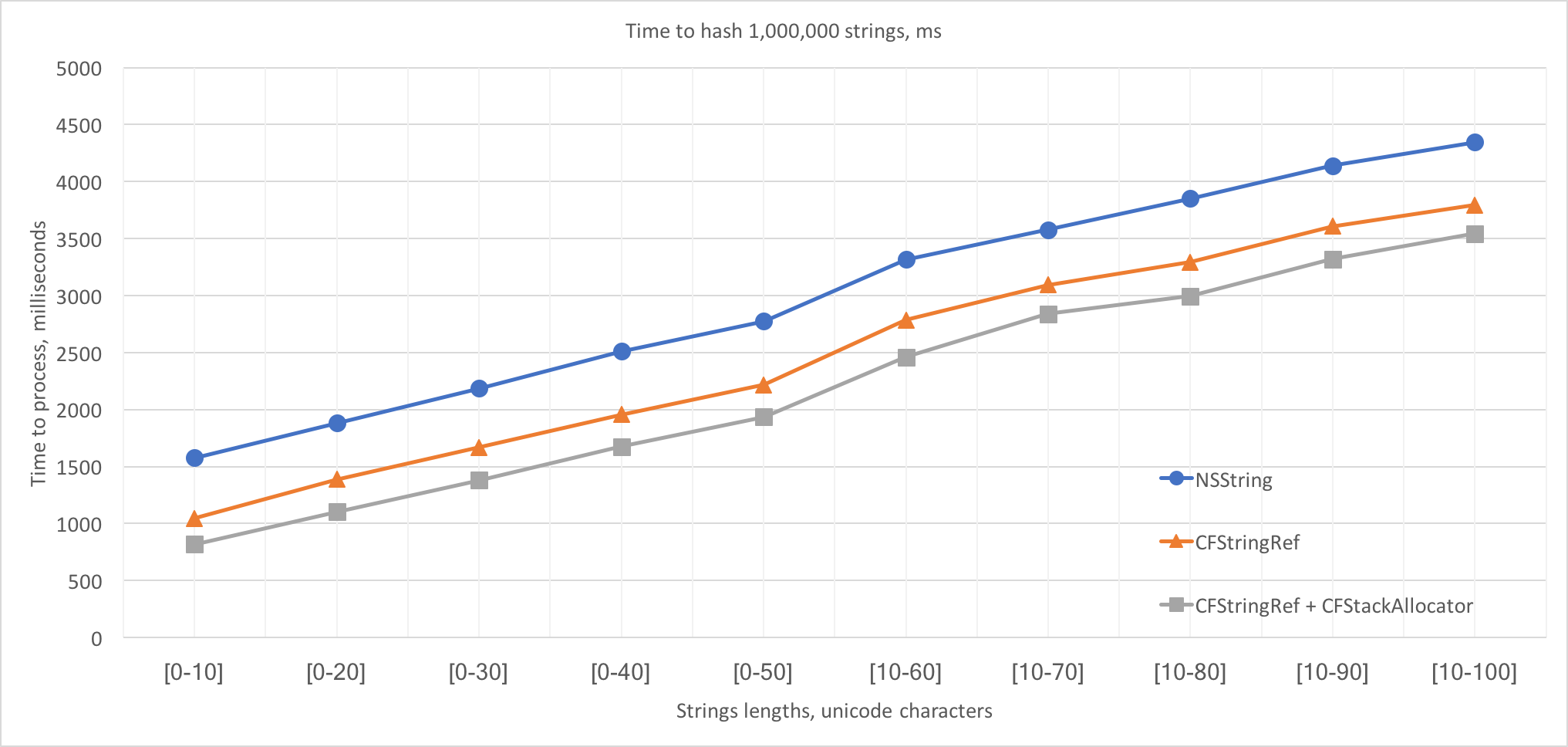
And here are the results. These functions were called with the same data set consisting of 1,000,000 randomly generated strings with varying lengths.

On the provided data sets range, the CoreFoundation+CFStackAllocator implementation variant is 20%-50% faster than the pure Objective-C implementation and is 7%-20% faster than the pure CoreFoundation implementation. It’s easy to observe that Δ between timings is almost constant and represents the difference between times spent in the management tasks. To be precise, the time spent in management tasks in the CoreFoundation+CFStackAllocator variant is ~800ms less than in the Objective-C variant and is ~270ms less than in the pure CoreFoundation variant. Divided by the strings amount, this Δ is ~800ns and ~270ns per string accordingly.
The stack-based memory allocation is a micro-optimization, of course, but it might be very useful in a time-critical execution path. The complete source code of the CFStackAllocator and of the benchmarking is available in this repository: https://github.com/mikekazakov/CFStackAllocator.